Module 4 – Assemble your editorial and publishing team
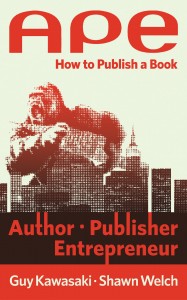
This is THE book that will legitimize self-publishing. The newly-released APE: Author, Publisher, Entrepreneur | How to Publish a Book by Guy Kawasaki and Shawn Welch is the best all-in-one resource for professional and stylish self-publishing. Available now as a Kindle eBook and coming soon in paperback.
It explains every step: from writing to design to publishing to marketing, for both eBooks and print editions. A key message of the book is that self-publishing is a misnomer. An author is now an entrepreneur. In order to publish professionally and credibly you need to assemble your own team of experts.
I highly recommend that you buy APE. Pay special attention to Chapters 8 – 10 on editing and cover design. And to chapter 12 on how to sell your book through Amazon, Apple etc. Below are more of my specific recommendations and resources for assembling your team.
Read my Top Ten Questions with Guy and Shawn.
Assemble your team
Here’s who you need on your team:

Beta Readers
Researcher
Editor
Proofreader
eBook cover designer
eBook formatter
Beta Readers
Beta readers can help you in several ways. But here’s the number 1 caveat: do NOT send them your rambling first draft. It will not be of any use to have work colleagues (or, god forbid, family members) giving you unsolicited feedback on your grammar or punctuation.
What you can show to early readers and ask for specific feedback on is:
Your outline: ask if you’ve left something out in covering your topic. What are the holes? Is there a different way to organize your material?
A short, fairly polished chunk of your writing: send a few pages (up to 10) and ask for feedback on the articulation of your idea. What do they find compelling about it? What questions does it raise?
How to share your document: you could post your outline (or a few pages) to Facebook or Twitter via a link to a public Google doc. Or send your Word doc by email. If you use email, I recommend sending a personal note to each reader, asking for their input because you know they’re an expert on X or Y and you value their feedback.
Researcher
Even if your book is short, you can use a researcher in several ways. A researcher could compile a list of resources (books or articles related to your topic, along with current URLs) that you include at the back of your book.
If you are looking for epigrams (the provocative quotations you often see at the beginning of a book chapter), a researcher can help you find them. Your best bet to find a researcher is to ask the editor you decide to work with. Other options: eLance, Guru, CraigsList (search on writing & editing), Virtual Assistant Network or oDesk.
Editor
A great editor could be your new best friend. A great editor that you feel comfortable with and suits your needs can be hard to find. My comprehensive blog post on Help! I need a book editor will give you a good background on what editors do and how to find one.
Essentially, there are three types of editors: developmental or content editors (that’s why I do with you), copyeditors or line editors (they get down into the paragraph and sentence level to clean up your prose and make it sing) and proofreaders (they clean up typos and fix any remaining grammar mistakes).
You can search for a qualified editor through the Editorial Freelancers Association. More recommendations for where to find editors in my blog post. Consult the EFA’s rate chart for standard editing rates.
Several Beta Authors have worked with nonfiction editor Barbara McNichol. You are welcome to reach out to her directly and use my name as a reference.
Tip: a great way to qualify an editor is to ask him or her to do a “before” and “after” sample edit of a few pages of your manuscript. See Barbara McNichol’s before and after samples.
The APE book site offers a Copyediting Aptitude Test you can give to an editor you are considering hiring. Click on Tools and Resources and scroll down to Downloads.
Proofreader
I am including a proofreader as a separate member of your team because it’s important to note that not all editors specialize in proofreading. Find a dedicated proofreader. They are the least expensive kind of editor to hire. And the most crucially important to use, before you convert your Word doc to an eBook file.
Do not skip this step! Nothing will ruin your credibility as an author faster than a typo or misspelling in your book.
Cautionary tale: I recently discovered that there was a blaring typo in the first sentence of the Acknowledgments in Voxie Media author Robert Phelan’s book. Eegads. At least three people, including me, had read the final book layout several times. We missed it!!
I hired a proofreader on the spot and luckily she didn’t find any additional typos. I recommend Alison Lueders of Great Green Editing for proofreading. She is fast and inexpensive (it took her about two hours to proofread a 100-page manuscript).
eBook cover designer
The most important consideration for an eBook cover is that it pop visually and be legible and distinctive even in a tiny thumbnail size. That is how most Amazon readers will first be introduced to your book. Don’t waste the opportunity to seduce them. Here is an detailed and informative article on Successful Seduction… and Rethink(ing) Cover Design for a Small, Small World.
In a word, do not even think of getting a graphic designer friend, or someone at your office, to design your eBook cover. A previous Beta Author did this, against my advice, and you can see that the cover is hard to decipher. His eBook is terrific, BTW. But the cover works against him.
Use a professional who knows how to design a digital book cover for maximum impact, interest and intrigue. You want a cover that, along with your title, will inspire a click to buy (or at least download the free sample). He or she will know the exact specs to use for Amazon Kindle.
You’ll find a short list of specific recommendations for cover designers in my blog post: Help! I need an eBook cover designer.
Want ideas for book covers? Here is a list of best book covers of 2012. Use these to talk to a designer about what elements you like – and don’t like. As with building a website, it helps a lot to be able to explain what you want.
Below is an informative and useful interview with professional cover designer Melanie Shellito of Artezen.com.
 Listen to the interview with book cover designer Melanie Shellito

Bonus: Download a Creative Brief [PDF] explaining how to commission an eBook cover
eBook formatter
Chapter 13 in APE explains how to convert your Word file into the file format used by Kindle and the other e-readers. But all you need to know is this: Amazon Kindle uses a .mobi file format. And all the other devices (Nook, Apple iBooks and Kobo) use an epub file format.
My best advice is do NOT try and convert your Word file yourself. Hire either 52Novels (Rob Siders, below, is the principal) or eBookArchitects to do the conversion and formatting for you. It will cost you several hundred dollars and it is entirely worth it.
The result will be an eBook file that displays perfectly on a Kindle. Nothing funky or out-of-place that will cry out, “This eBook is self-published!” Your reader can change the font size, use a clickable table of contents and enjoy a seamless reading experience.
Q&A with Rob Siders of 52 Novels on eBook formatting for Kindle and the other readers.
 The recording of the interview with book publicist